Tag: ZenDeck

  • What ZenDeck Does When You Press Play (Without Touching a Single Setting)

    What ZenDeck Does When You Press Play (Without Touching a Single Setting)

    On a PC handheld, pressing Play often comes with a mental checklist.

    If you’re new to Smart Profiles, this earlier post explains what they are and why they exist.

    Did I change the resolution last time?
    Are the in-game settings still right?
    Is this game going to drain my battery in 30 minutes?

    Smart Profiles exist to remove that friction — but what actually happens when you launch a game?

    Not the technical implementation.
    Not the hidden mechanics.
    Just the experience and intent behind it.


    The Moment You Press Play

    The instant a game is launched, ZenDeck looks at the context of that session.

    Not every launch is the same:

    • Different games behave differently on handheld hardware
    • Different devices have different limits
    • Different sessions have different goals

    ZenDeck treats launching a game as a decision point, not just an executable starting.


    Is This Game Supported?

    Some games are explicitly supported by AutoPilot Smart Profiles.
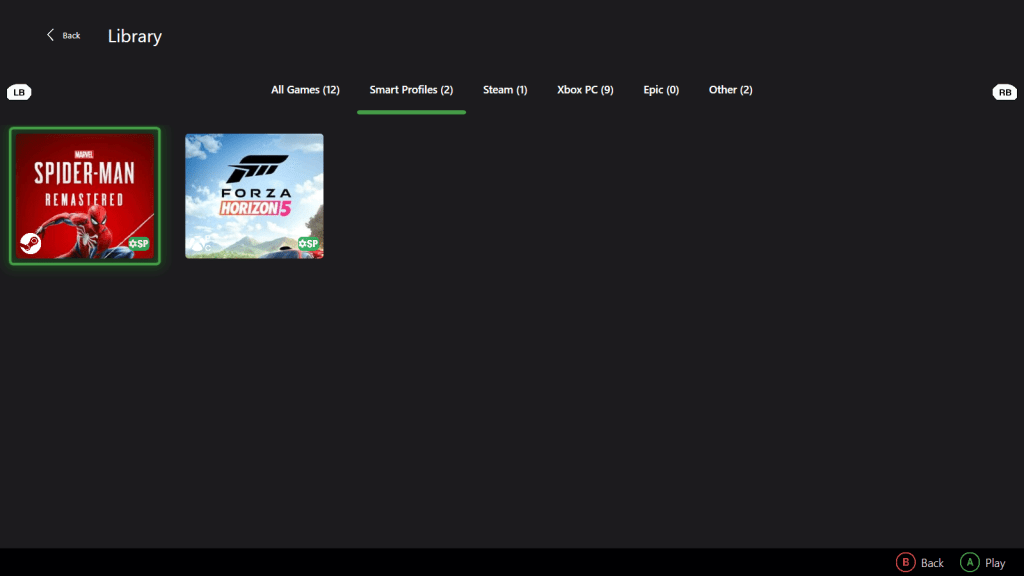
    ZenDeck library showing Smart Profiles supported games
    Supported games are clearly marked and organized inside the library.

    These titles are marked with an SP badge, which means:

    • The game has been tested intentionally
    • A Smart Profile exists for it
    • ZenDeck knows how to prepare it properly for handheld play

    If a game isn’t supported, nothing special happens — it launches normally, without interference.
    Smart Profiles are additive, never intrusive.

    Support is intentional and curated, not automatic or generic.

    Supported titles are clearly marked within ZenDeck and on the project website.


    Preparing the Game — Not Overpowering It

    Smart Profiles don’t aim for maximum settings or brute-force performance.

    Instead, they focus on starting the game in a sensible state for a handheld device:

    • Graphics options aligned with limited power and thermals
    • GPU features enabled only when they make sense
    • Resolution adjusted when necessary

    By the time the first frame is rendered, the game is already configured with efficiency in mind.

    No menus.
    No pop-ups.
    No presets to tweak.

    Want to see real-world proof?

    If you’re curious how this translates into actual performance:

    I ran a 5-minute real gameplay comparison in Hogwarts Legacy between:

    • Benchmark Ultra settings
    • Smart Profile (Quality)

    The results were dramatically different in stability and smoothness.

    You can read the full breakdown here:
    Hogwarts Legacy Ultra vs Smart Profile – Real Performance Test

    If you’d like a step-by-step walkthrough on how to install ZenDeck and enable Smart Profiles, you can follow this complete setup guide:

    Step-by-Step Installation Guide for ZenDeck


    Before Gameplay Even Begins

    This is an important distinction.

    Smart Profiles operate before gameplay, not during it.

    They prepare the environment the game starts in, rather than reacting after performance problems appear.
    That preparation is what allows everything else to work more smoothly.

    This is also why Smart Profiles and Dynamic TDP don’t overlap — they do different jobs.


    Smart Profiles vs Dynamic TDP

    AutoPilot is made up of two complementary systems, each with a very different role.

    Smart Profiles focus on preparation.
    It decides how a game should start on a specific handheld device.

    Dynamic TDP focuses on adaptation.
    It manages power behavior in real time once the game is already running.

    They don’t overlap, and they don’t compete.
    One sets the baseline, the other continuously adjusts around it.

    Together, they reduce the need for manual tuning without exposing extra controls to the player.


    Not Every Session Needs Maximum Performance

    Sometimes you’re at home, plugged in, chasing smooth visuals.

    Other times, you’re on a couch.
    Or on a train.
    Or on a long flight, trying to play for hours without worrying about battery life.

    The intent of the session changes — even if the game doesn’t.

    Smart Profiles are designed with this flexibility in mind.
    They’re not about pushing hardware to its limits, but about aligning the game with the context it’s being played in.

    A more battery-conscious session may prioritize:

    • Lower in-game settings
    • Reduced power demands
    • Stability over headroom

    All without requiring the player to manage those tradeoffs manually.

    This is the kind of experience Smart Profiles are designed to support.


    What the User Never Has to Think About

    When everything works as intended, the user never asks:

    • Did I forget to change the resolution?
    • Are GPU features enabled correctly?
    • Should I lower settings for this device?
    • Is this game draining more power than it should?

    Those questions simply don’t come up.

    The goal isn’t to expose more controls — it’s to remove decisions that shouldn’t be necessary in the first place.

  • Playing on PC Shouldn’t Feel Like Managing a System

    There’s a strange thing we’ve normalized in PC gaming.

    Before you actually play, you prepare.

    You open settings.
    You tweak graphics.
    You check performance overlays.
    You think about battery life, temperatures, profiles, limits.

    None of this feels unusual anymore. It’s just “part of PC gaming”.

    But it shouldn’t be.


    When playing became a task

    On consoles, you press a button and play.

    On PC, especially on modern handhelds, you make decisions first.

    Not because you want to, but because you feel responsible for the outcome.

    If performance isn’t great, it’s on you.
    If the battery drains too fast, it’s on you.
    If the experience stutters, you assume you missed a setting.

    Over time, playing starts to feel less like entertainment and more like system administration.

    And that’s the part that bothers me.


    Control is not the problem

    PC gaming has always been about control, and that’s a good thing.

    Being able to tweak, customize, and adapt is what makes the platform powerful.
    The problem isn’t having control.

    The problem is when control turns into constant responsibility.

    When every session begins with questions:

    • Should I change profiles?
    • Is this game using the right resolution?
    • Am I wasting performance or battery?
    • Do I need to adjust something before this feels right?

    At that point, you’re no longer just playing a game.
    You’re managing a system.


    Handhelds made this impossible to ignore

    This becomes especially clear on PC handhelds.

    These devices are meant for quick sessions.
    The couch. The bed. A break between things.

    They’re not desks.
    They’re not benchmarking stations.

    And yet, they inherit all the friction of desktop PC gaming, sometimes amplified.

    Small screens make bad settings more noticeable.
    Battery constraints make every choice feel important.
    Performance swings are harder to ignore.

    On a handheld, friction breaks immersion instantly.

    That’s where the system-management feeling becomes impossible to justify.


    If the user has to think, something failed

    This is where my mindset shifted.

    I don’t believe the solution is more options.
    I don’t believe it’s better overlays or more detailed graphs.

    Those tools are useful, but they’re still asking the user to think.

    My goal has been the opposite:

    The less the user has to touch, the better the system is doing its job.

    Good automation isn’t loud.
    Good automation doesn’t ask for attention.
    Good automation disappears.

    If you’re constantly aware of the tool helping you, it’s probably helping too much — or in the wrong way.


    Automation as respect

    Automation often gets framed as convenience.

    I see it as respect.

    Respect for the player’s time.
    Respect for their focus.
    Respect for the fact that they sat down to play, not to optimize.

    That doesn’t mean blind automation.
    It doesn’t mean guessing.
    It doesn’t mean “AI decided this is optimal”.

    It means being intentional about when the system should act, and when it should stay out of the way.

    Sometimes the best decision is doing nothing at all.


    A shared philosophy across different projects

    At a high level, Winhanced and ZenDeck aim for the same thing:
    a console-like gaming experience on Windows.

    The difference isn’t the goal, it’s the surface.

    Both act as launchers that detect games, and reduce friction so the system feels designed for playing instead of managing Windows.
    The UI changes. Some features change.
    The intent stays the same.

    As that ecosystem evolved, it became clear that automation itself needed to be split by responsibility.

    That’s where the AutoPilot suite started to take shape.

    AutoPilot – Dynamic TDP focuses on system-level behavior.
    It automatically adjusts power limits based on multiple runtime signals, similar in spirit to what Microsoft have recently introduced with Default Game Profiles, with one key difference: it works across all games from any store.

    It handles the kind of decisions that shouldn’t require constant user attention, regardless of where or how the game was launched.

    AutoPilot – Smart Profiles, previously known as AutoPilot+, operate at a different layer.
    Instead of touching the system, they focus on the game itself, managing in-game settings, resolution, and GPU features when required, based on how each title is actually configured.

    The names changed because the boundaries became clearer.

    One system adapts the device.
    The other adapts the game.

    Different layers.
    Different responsibilities.
    Same philosophy.

    Reduce friction, automate what makes sense, and let the player focus on playing.


    The goal isn’t peak numbers

    Another thing that often gets misunderstood is performance.

    Chasing the highest FPS or the longest battery life looks good on paper, but it rarely translates to a better experience.

    What actually matters is consistency.
    Stability.
    Predictability.

    A game that feels right beats one that wins benchmarks but constantly pulls your attention back to the system.

    That’s why I’m far more interested in removing unnecessary decisions than exposing every possible knob.


    Playing should feel simple again

    PC gaming doesn’t need to lose its flexibility.
    It doesn’t need to become locked down.

    But it does need to stop demanding so much mental effort just to feel good.

    If, before playing, you already feel like you’re managing variables, something went wrong upstream.

    Playing should feel like playing.

    Not like maintaining a system.
    Not like preparing a workload.
    Not like doing pre-flight checks.

    Just playing.

    That’s the experience I keep chasing, and the reason I care so much about making the system disappear when it’s doing its job right.

    Follow-up:
    I’ve written a follow-up post explaining how AutoPilot Smart Profiles attempt to solve this problem in practice.

    Read: AutoPilot Smart Profiles Automatically Optimize Games for PC Handhelds